Search Console: your social media accounts finally join your Google stats
Google now lets you connect Instagram, TikTok, X and YouTube to Search Console. What these "platform properties" really measure, how to turn them on in two minutes and why they matter for a small business.
Key takeaways
- Search Console now accepts your Instagram, TikTok, X and YouTube accounts as "platform properties", each added separately
- You see the Google impressions, clicks and queries (Search, Discover, Google News) that lead to your posts and videos, not likes or in-app views
- No Facebook or LinkedIn for now, and no history: connect your accounts right away to start collecting data
AI-generated summary
You've been posting on Instagram or YouTube for months, but you have no idea what Google does with your posts? Well, that's normal: until now, Search Console only looked at your website. Full stop.
Except that's changing. Google now lets you connect your Instagram, TikTok, X and YouTube accounts to it. I told my clients about it by email this morning, and honestly, it deserves a short article too.
"Platform properties": what is this thing?
In Search Console, a "property" is whatever you track. Until now, it had to be a website. There is now a new type: platform properties. Basically, each social account becomes its own property, with its own reports, just like a website.
Google tested the feature on a handful of sites in late 2025, then officially announced it in July 2026. The rollout happened gradually, and plenty of people are only discovering it now (and since I spend quite a lot of time in my clients' Search Console accounts, I'm not going to act smug about it either ^^).
What it measures (and what it does NOT)
In practice, you see how your social posts show up on Google: regular search, Discover and Google News. The Performance report gives you the usual metrics:
- impressions : how many times your posts and videos were shown on Google;
- clicks from Google to your content;
- click-through rate and average position ;
- queries : what people typed before finding you. And that is pure gold.
There's also an Insights report (trends, best-performing content, how people find you) and an "Achievements" report that congratulates you when you beat a click record. Always good for morale.
That said, let's be clear: it does NOT replace Instagram or TikTok analytics. No likes, no comments, no watch time, and no views made directly in the app. Google says so itself: these properties only show how your content performs on Google Search. It isn't the traffic from your social accounts to your website either: for that, Google Analytics is still the tool for the job.
A small detail worth knowing: an Instagram story shown on Google counts as an impression, and as a click if someone taps it. Same for a video opened in Google's viewer, even if the person never sets foot on the platform.
How to turn it on in 3 steps
Nothing complicated, it takes two minutes, as usual:
- In Search Console, open the property menu at the top left and click "Add property".
- Click "Add" next to the platform you want.
- Sign in to your account to allow access, then click "Go to property".
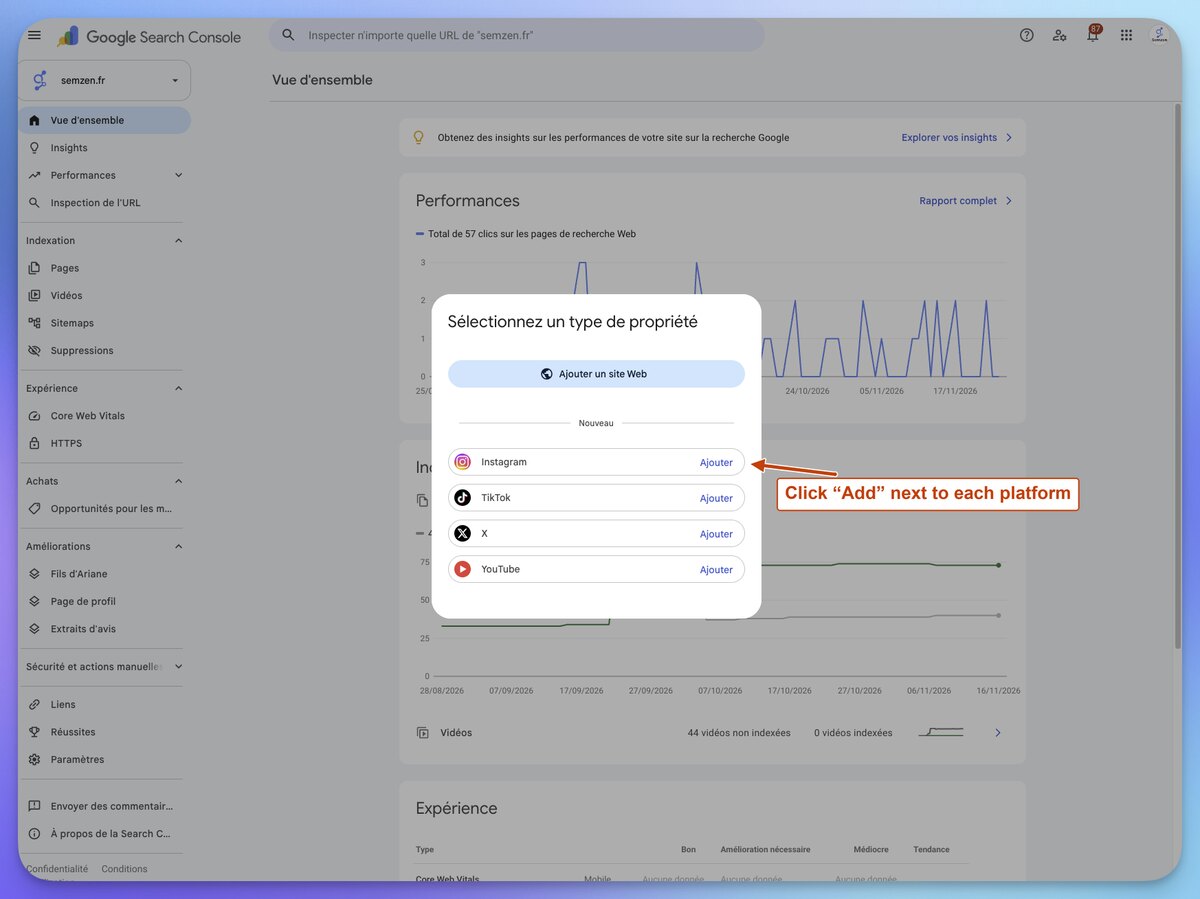
And there you go, done! Each account is added separately: if you have an Instagram account AND a YouTube channel, you do it twice.
The annoying part is that there's no history. Reports start on the day you connect the account, and the first data arrives within a few days. So the sooner you do it, the sooner you'll have something to compare against. Google also checks regularly that the account is still yours: if the connection expires, the reports are paused until you reconnect, but you get your data back.
A friendly tip: connect your accounts with your company's Google account, not the one belonging to the intern who's leaving in three months. And if you can't see the option yet, don't panic: Google says the rollout is gradual, so check again in a few days.
What about Facebook? And LinkedIn?
Well, no. For now, it's Instagram, TikTok, X and YouTube, and that's it. No Facebook, no LinkedIn. Too bad, especially for all the B2B companies that bet everything on LinkedIn. Fingers crossed for what comes next.
So, what's in it for a small business?
Let's not kid ourselves: it won't make your sales skyrocket overnight. But it's a real goldmine of information.
The most interesting part is the queries. If one of your YouTube videos shows up for "how to maintain a wood stove", it means people are searching for EXACTLY that on Google. You've got a topic for an article on your website, a question for your FAQ or the idea for your next video. In short, your social accounts become a small lab for spotting what your customers really care about. And you finally have one place to track your visibility on Google, website AND social accounts.
Honestly, if I were you, I'd connect my accounts today, if only to start collecting data. And if you'd like us to look together at what Google says about your website and your social accounts, that's exactly what my ongoing SEO support.
Sources: Search Console Help — About platform properties in Search Console, Google Search Central — See how content from social and video platforms performs on Google Search, Google Search Central — Platform properties roll out globally
Translated from the original French article. Publication dates, examples and figures refer to that original version.