ChatGPT business profiles: the Google My Business of AI has arrived
OpenAI is launching Businesses in ChatGPT: a business listing you can claim in ChatGPT, Google My Business style. I tested mine: verification, statistics, editable tabs and limits.
Key takeaways
- Businesses in ChatGPT lets you claim your business in ChatGPT through the Business Hub, then verify your identity with Persona to publish your changes
- You can edit the category, description, contact details, photos, address and hours, and track mentions, profile views and clicks over 7 or 28 days
- Claiming your listing doesn't guarantee extra visibility and agents are still limited to the United States, but it's the foundation for AI to say accurate things about you
AI-generated summary
Spent years pampering your Google listing, scraping together reviews and updating your bank holiday opening hours? Good news: you get to do it all again. Well, almost.
On 10 November 2026, OpenAI launched Businesses in ChatGPT, in beta. Basically, it's the AI version of Google My Business: you claim your business in ChatGPT, fix its details and see how people find it. And since ChatGPT says it has 1.2 billion users a week, it's worth a proper look.
As usual, I wasn't going to talk about it without testing it. So I claimed my own listing, and here's the guided tour (address and phone number blurred, let's not get carried away).
Claiming your listing: an obstacle course (the light version)
Everything happens in the Business Hub, available from the ChatGPT sidebar. You search for your business by name, select the right listing and prove that it's really yours.
To do that, OpenAI offers several methods depending on the listing: a code by text or phone call to the business number, a code sent to the business email, a TXT record to add to your domain's DNS, or connecting your Shopify store. You don't need an ads account or an Enterprise subscription to claim it.
Except that's only the first step. To publish changes, see the statistics or create an agent, you THEN have to pass an identity check with Persona : ID document, company registration details, proof that you really represent the business. That's also the step that unlocks the little blue verification badge. Friendly tip: enter the exact legal name from your official paperwork, otherwise it gets stuck.
On eligibility, OpenAI stays cautious: it depends on the country, the type of business and the checks. The official help even says that physical shops and restaurants can, for now, only claim an existing listing in the United States. My consultancy listing, however, already existed in France, and it does show its blue badge. In short, give it a go and see what ChatGPT offers you.
The dashboard: mentions, views and clicks
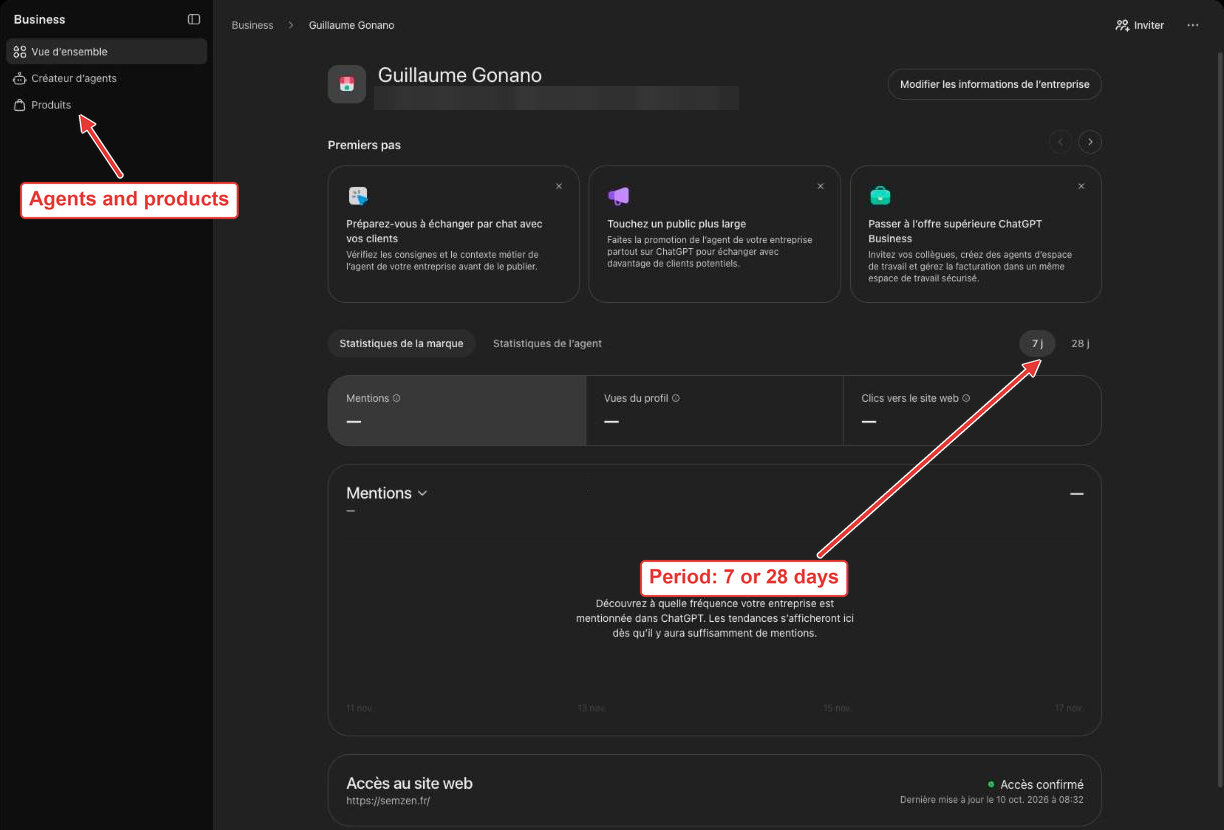
Once inside, the overview shows three counters: mentions (how often ChatGPT talks about you), profile views and website clicks. You can switch between the last 7 and 28 days, and there's a separate tab for agent statistics.
A small detail that matters: for an online business, a mention counts when ChatGPT cites your website, not just your name. For a local business, it counts as soon as your location appears in a result, even if nobody clicks.
Just below, a "Website access" block confirms that OpenAI can crawl your site (mine says "Access confirmed"), followed by a top 5 of discovery topics : the main themes of the answers you appear in.
And as you can see, mine is still a desert: dashes everywhere. Don't panic. OpenAI explains that an empty counter doesn't mean zero activity, just that the privacy threshold hasn't been reached or the data is still coming in. And no, you'll never see users' exact questions (sad news for the curious, good news for privacy).
What you can edit, tab by tab
The "Edit business information" button opens an editor with a REALLY handy feature: a live preview of the listing on the right.
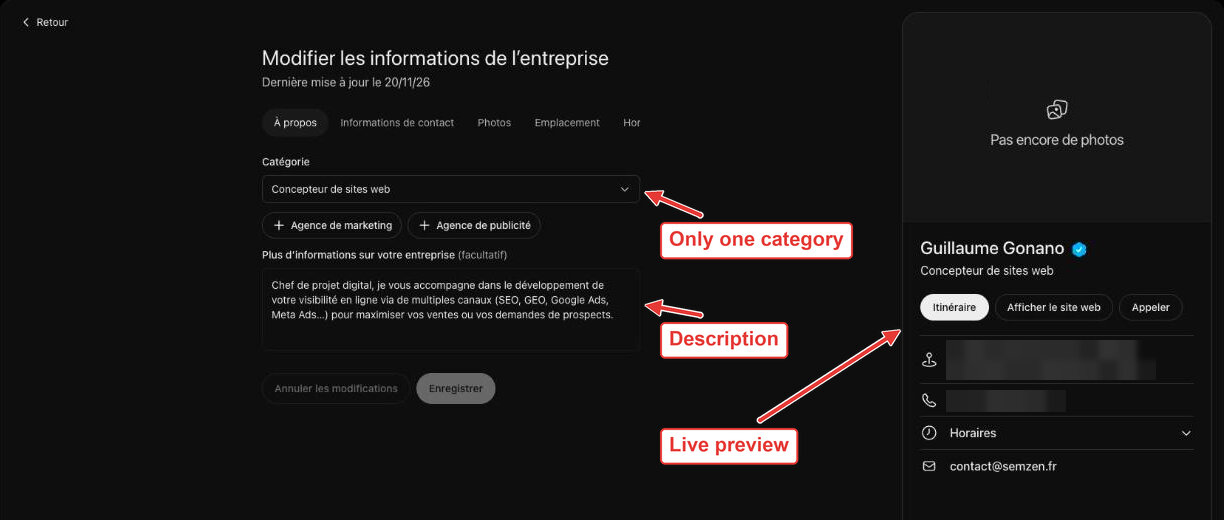
Here's what you'll find:
- About : the category, chosen from a long list, and a free description of your business. Heads-up: for now you can only keep ONE category, so no combining "Marketing agency" and "Advertising agency"; I had to settle for "Website designer" (not exactly my job, but there you go);
- Contact information : phone, business email and website;
- Photos : upload your images (mine proudly says "No photos yet", I know);
- Location : postal address, extra details (flat, unit…) and a position on a map;
- Hours : time slots day by day, with several ranges possible, and the time zone.
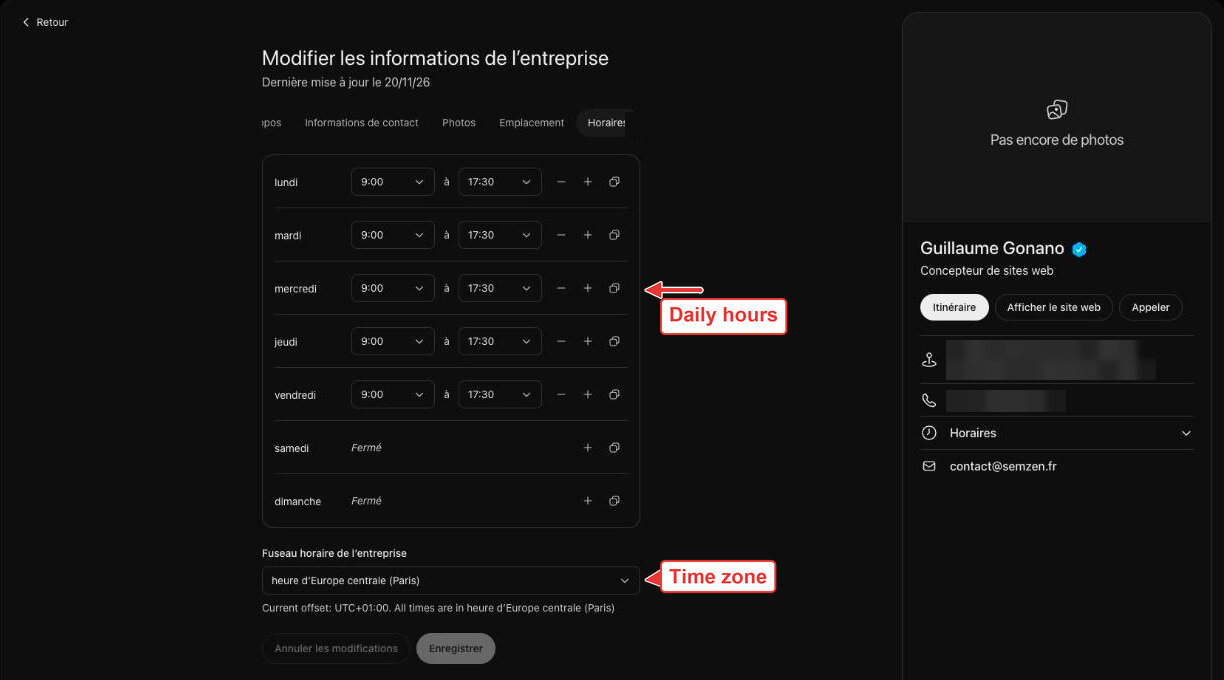
Depending on the type of business, OpenAI's help also mentions the logo, a cover photo, and delivery and returns policies.
The painful bit: your changes don't go live straight away. OpenAI reviews them before publishing, it can take time, and ChatGPT may keep drawing on other sources. The terms of use even state that OpenAI may supplement, edit or replace your listing's information using other sources, or not display what you submitted at all. You manage your listing, but you're not the only one at the helm.
Products and agents: the future… mostly American
In the sidebar, there are two more tabs. Products lets you connect a product feed (a CSV or the URL of a hosted feed) so that ChatGPT shows your prices and availability. Shopify merchants can reuse their catalogue directly.
And then there's the Agent builder, the real novelty: an assistant in your colours that answers customers' questions about your products and terms, in a separate, clearly labelled conversation. It doesn't take orders or bookings; it sends people to your website. OpenAI even lets you sponsor it through ChatGPT ads. Except that, for now, it's reserved for eligible ecommerce and online service businesses in the United States. On my side, the tab politely says "Agent builder isn't available yet". Oh well.
One last nice detail: the "Invite" button lets you add other admins, and the admin can give their agency access. Handy when you delegate (just saying ^^).
So, is it worth it?
Let's be honest: claiming your listing won't shoot you to the top of the recommendations. OpenAI says it in black and white: it doesn't guarantee any extra visibility, and advertising doesn't influence ChatGPT's "natural" answers. So it's not a magic button.
On the other hand, it's a small effort to make sure the AI says ACCURATE things about you: the right category, the right hours, the right website. And that's exactly the foundation of local SEO, AI edition. The statistics will also give you a first measure of your presence in ChatGPT, which was sorely missing until now.
Honestly, in your shoes, I wouldn't leave my listing to gather dust. And if you want to go further and get cited by ChatGPT, Gemini or Perplexity, that's exactly what my support covers: AI search optimisation.
Sources: OpenAI — Introducing Businesses in ChatGPT, OpenAI Help Center — Setting up your business on ChatGPT, OpenAI — Businesses in ChatGPT Terms
Translated from the original French article. Publication dates, examples and figures refer to that original version.